What to Use Instead of Spreadsheets and Outlook
What replaces the spreadsheet and inbox in a UK mortgage practice, how it sits alongside your sourcing tool and network, and how to move across.
Written by
Charlotte BrownRole
Mortgage Industry Writer
Most small mortgage firms don't run on a single tool. They run on a spreadsheet, an Outlook inbox, a shared drive and the adviser's memory, with the adviser doing the job of connecting them. It works until volume grows, a second adviser joins, or someone asks to see how a case was handled two years ago.
This guide is about what to replace that setup with, and what to leave exactly where it is. If you're still deciding whether to move at all, why brokers are switching away from spreadsheets covers the case for it.
What the spreadsheet and inbox are really doing
The spreadsheet is rarely just a tracker, and the inbox is rarely just email. Between them they cover most of what a case needs.
| Job | How it's done today | What does it in a case system |
|---|---|---|
| Tracking where each case is | A row per case, a status column | A pipeline of cases by stage |
| Knowing what to do next | Colour coding and memory | A task list and a "needs attention" view |
| Collecting documents | Email attachments, saved by hand | Document requests clients answer in a portal |
| Keeping clients updated | Phone calls and replies | A portal showing the case stage, plus automatic emails |
| Remembering renewals | A date column someone has to check | Reminders created from the product end date |
| Tracking fees | Another tab | Fee fields on the case |
| Proving what happened | Searching the inbox | An audit trail recorded as you work |
Each of those jobs works in a spreadsheet and an inbox. The problem is that they're spread across two tools that don't know about each other, so every update happens twice and the only link between them is you.
The category you're actually choosing
What replaces this setup is case management software built for mortgage and protection advice. It's easy to end up looking at the wrong thing.
A generic sales CRM is built around deals moving to a close. A mortgage case keeps going after completion, through the offer, the renewal and the record you have to be able to produce years later. A sourcing tool finds products and rates, which is a different job again. Case management sits between them. It holds the client, the fact-find, the documents, the recommendation, the tasks and the history in one record per case.
What to look for in a mortgage broker CRM goes through the features that matter when comparing options.
How it fits alongside what you already use
The fear most advisers have is that a new system means replacing everything. It doesn't. Here is the typical setup today:
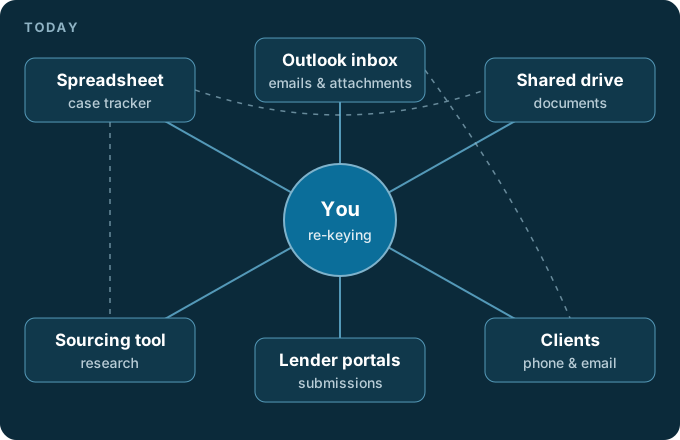
And here is the same practice with a case system in the middle:
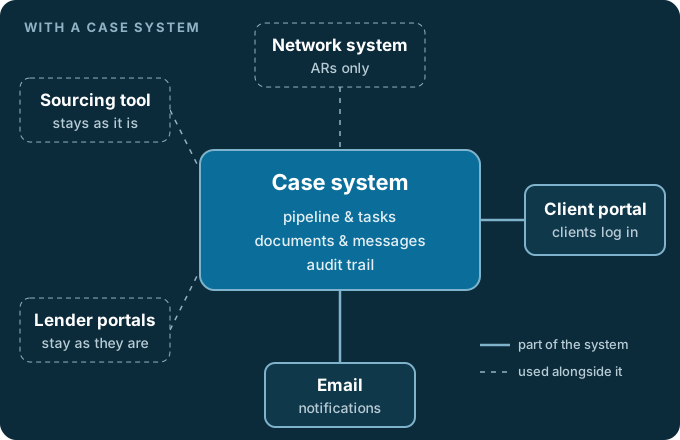
In words, this is what changes and what doesn't:
- The case system replaces the spreadsheet tracker, the shared drive of case documents, and the inbox as the place client communication lives.
- Your sourcing tool stays. You research in it as you do now and save the output to the case.
- Lender portals stay. Applications are still submitted where each lender wants them.
- The network system stays, if you're an AR. The DA and AR comparison covers what the network route involves. Your case system handles the client journey around it.
- Outlook stays for general email. It stops being your filing cabinet.
A migration checklist
Most firms can't import years of spreadsheet rows in one go, and they don't need to. The modern practice guide makes the same point: what matters is that the next case runs properly from day one.
- Pick a switch date. From that day, every new case starts in the new system and nowhere else.
- Move open cases first. Add each live case, its current stage and any documents already received. Closed cases can wait.
- Archive the spreadsheet read-only. Don't delete it. Old records still have to be kept, and switching without losing case history explains how long and why.
- Set up your stages. Match them to how you actually work, with separate stages for protection cases if you run them.
- Carry over renewal dates. The product end dates in your spreadsheet are the most valuable column in it. Make sure each one exists in the new system before you archive the old one.
- Move client communication to the portal. Send document requests from the system rather than by email. Collecting documents from clients covers why that matters.
- Tell your clients. A short message explaining where to upload documents and where to see their case saves most of the confusion.
- Review after a month. Check what still ends up in your inbox and move it across.
How Cleera handles it
Cleera is one example of this category, built for UK mortgage and protection advisers. Cases sit on a pipeline board by stage, and the account owner can set up stages for each type of case. Protection is its own case type and can be linked to the mortgage case it came from. A dashboard lists what needs attention, such as overdue forms, outstanding documents and cases that have gone quiet, alongside each adviser's tasks and due dates.
Clients get a secure portal where they see their case stage, answer document requests and message the adviser. Automated emails for events such as an offer or completion can be switched on or off for each firm. Proc fees are tracked from written to banked, and every case records where the client came from.
On Solo Pro and above, renewal and review reminders are created from the product end date, there's reporting across the pipeline, and existing fact-finds can be brought across by uploading the PDF or a photo, with AI filling in the fact-find for the adviser to review. Any case can be exported as a single file with a summary and all its documents.
It's worth being clear about what Cleera doesn't do. It has no sourcing engine, it doesn't sync with your Outlook mailbox, and it doesn't bulk-import spreadsheets. It sits alongside your sourcing tool and, for ARs, your network system. See how the mortgage CRM works or get in touch to talk through your setup.
Share this article
Who this is for
Built for firms of one, and firms of twenty
For a sole trader or a 2–10 adviser firm, Cleera is the default choice. Appointed representatives use it alongside a network system, not instead of one.
Sole trader
Running cases on your own, still want an FCA-ready audit trail without the overhead of enterprise software.
2–10 adviser firm
A growing team that needs one shared pipeline, not five advisers working from different spreadsheets.
DA or AR alongside a network
Cleera is a mortgage and protection CRM and platform for intermediaries that sits alongside your sourcing tool and network CRM. It is not a sourcing engine, and it does not replace them.
Frequently asked questions
Do I have to give up my sourcing software?
No. A case management system is not a sourcing engine and shouldn't be sold as one. You keep researching products in the sourcing tool you already use and save its outputs to the case file, so the evidence for the recommendation sits with the rest of the case.
I'm an appointed representative and my network gives me a system. Do I need another one?
Not always. If your network requires the advice file to live in its system, that doesn't change. Many ARs still run the day-to-day client journey (document requests, client updates, tasks and renewals) in their own case system and keep the network system for what the network asks for. The trade-off is some double entry, so check what your network allows before you commit.
What should happen to my old spreadsheet?
Keep it, read-only, somewhere safe. Closed cases don't need moving on day one, but the records behind them still matter: suitability records must be kept for at least three years under MCOB 4.7A.25R, and the Financial Ombudsman can consider a complaint up to six years after the event.
Do I still need Outlook?
For general email, yes. What changes is that client case communication and documents stop living there. Clients message you and upload documents through a portal tied to the case, and routine updates go out automatically, so your inbox stops being the only record of what happened.
How long does it take to move off spreadsheets?
It depends mostly on how many cases are open, because those are the ones you move first. Closed cases can stay in the archived spreadsheet, and new cases start in the new system from the day you switch.
Try Cleera
Run your firm efficiently.
Manage mortgage and protection cases together. Pipeline, branded client portal, document gathering, e-signatures, and an FCA audit trail in one place.